Open Spaces
Client
San Francisco Recreation & Parks Dept. (SFRPD)
Roles
Year
2025
Team
Project Manager, 2 UX Designers, Engineer
1 / 4
Swipe to navigate
Context
The San Francisco Recreation & Parks Department (SFRPD) is a city agency that provides a wide range of recreational programs and services to the public. The department is responsible for managing and maintaining over 1,000 parks, playgrounds, and other recreational facilities throughout the city.
The Users
Diverse community members including families planning picnics, school staff organizing events, sports coaches booking fields, and event planners coordinating large gatherings.
The System
A multi-platform ecosystem including the SFRPD website (CivicPlus), third-party platforms (ActiveCommunities, Formsite, Rec.us), phone support, and email communications.
The Evolution
Transitioned from a phone-heavy system ("constantly ringing phones") to online platforms post-2019, significantly reducing call volume but creating new usability challenges.
The Initial Challenge
Despite SFRPD's efforts to modernize their services, fundamental usability barriers were preventing users from successfully navigating the reservation system independently. The impact was measurable: in 2023 alone, staff handled 13,000 phone calls and 5,000 emails from users who couldn't complete their tasks online.
The Problem
Users struggled to find basic information on the website, couldn't easily determine which facilities met their needs, and faced a fragmented experience across multiple reservation platforms.
The Impact
System limitations increased demand for staff assistance, which in turn strained resources. The result was a reservation ecosystem that worked against both user needs and operational efficiency.
The Mission
Improve the experience that members of the public have with reserving SFRPD facilities while reducing service delivery costs and ensuring equitable access to San Francisco's public spaces.
Research
Research Methods
User Interviews
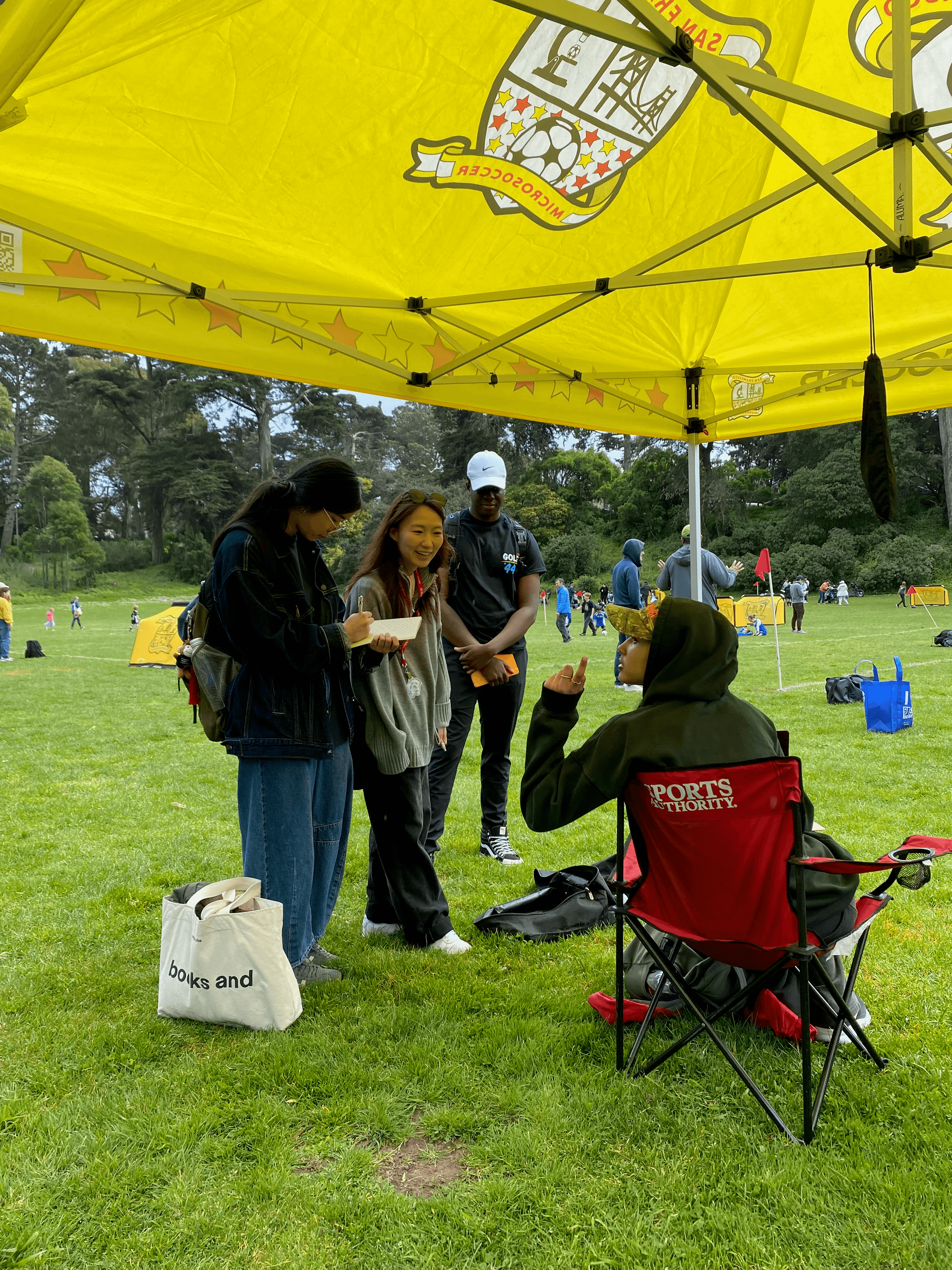
60+ interviews with park users to understand their needs, frustrations, and current reservation behaviors.
Staff Interviews
5 in-depth interviews with SFRPD staff to understand operational challenges and system limitations.
Call Log Data Analysis
Analysis of 800 phone calls to identify common user issues and support patterns.
Audit of Current Platforms
Comprehensive evaluation of the existing reservation system and user journey.
Analogous Domain Research
Research into similar reservation systems across different industries and contexts.
Competitive Analysis
Analysis of 8 competitor and analogous domain solutions to identify best practices.
Audit of Third-Party Vendors
Evaluation of existing third-party platforms and their integration challenges.
User Questionnaire
50+ survey responses providing quantitative data on user preferences and behaviors.
Research Insights
When systems are invisible, so are the expectations for using them.
Users don't know what's expected of them unless the system sets clear affordances or cues for behavior.
Poor discoverability kills credibility.
If users can't find what they need easily, they lose trust in the system or abandon it entirely.
A good system doesn't just show options — it guides users to the right one.
Interfaces should help users make confident decisions by clearly surfacing the best option for their goal.
Staff are forced to manually fill gaps in an incomplete service experience.
Due to fragmented tools, staff often intervene to help users navigate confusion, increasing their burden.
Access to a public space shouldn't require privileged knowledge.
Systems should be usable without prior insider knowledge, language fluency, or technical literacy.
The NEW Challenges
01
How might we make it easier for residents to discover, understand, and confidently navigate the reservation system - even if they don't know where to start?
02
How might we reduce the burden on staff by streamlining repetitive processes?
03
How might we improve access and equity for users with different levels of time, technical fluency, or familiarity?
Design & Prototyping
Approach
Our client's landscape is a complex one, consisting of legacy systems, budget limitations, and lean staffing. As a result, our design approach required working with these constraints rather than against them.
For Residents
We focused on increasing visibility and reducing guesswork, making it easier to find accurate information, understand policies, and complete common tasks without friction.
For Staff
We prioritized reducing redundancy, building tools that streamline communication and help them focus on the work that requires judgment, not repetition.
Prototyping
Parallel Prototyping
This phase focused on generating breadth, not polish. Each prototype targeted specific angles: real-time reservation, communication, discoverability, staff tools, or playful engagement.
Developed and tested 17 prototypes in parallel to explore diverse ideas and validate assumptions.
Iterative Refinement & Testing
We integrated insights from parallel prototyping into focused, feasible solutions that balance public usability with operational ease for staff.
Refined high-potential concepts into polished prototypes based on user feedback and feasibility.
This process clarified which ideas are worth developing, which should be discarded, and most importantly, what matters most to users: context, clarity, and control.
Solutions
Overview
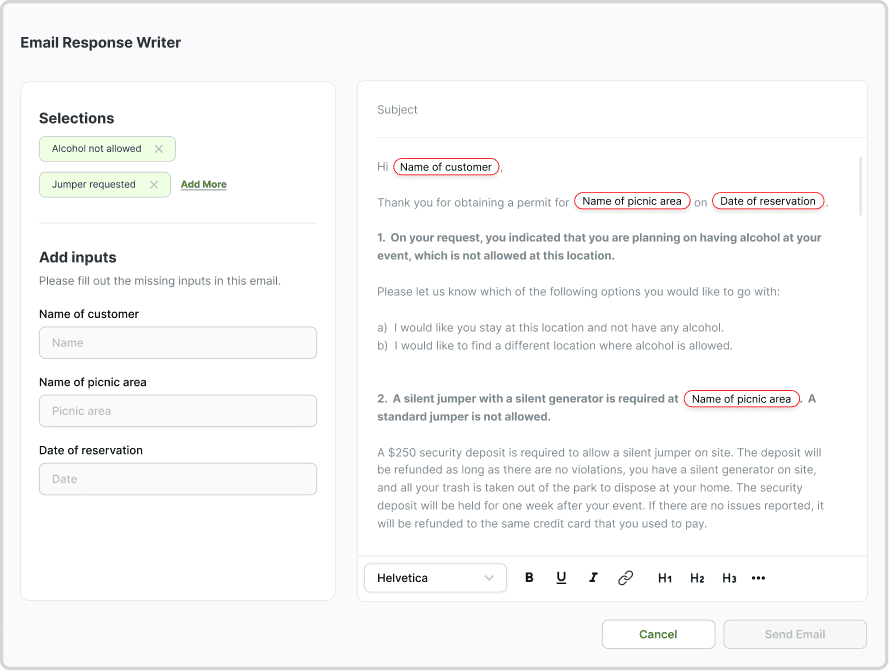
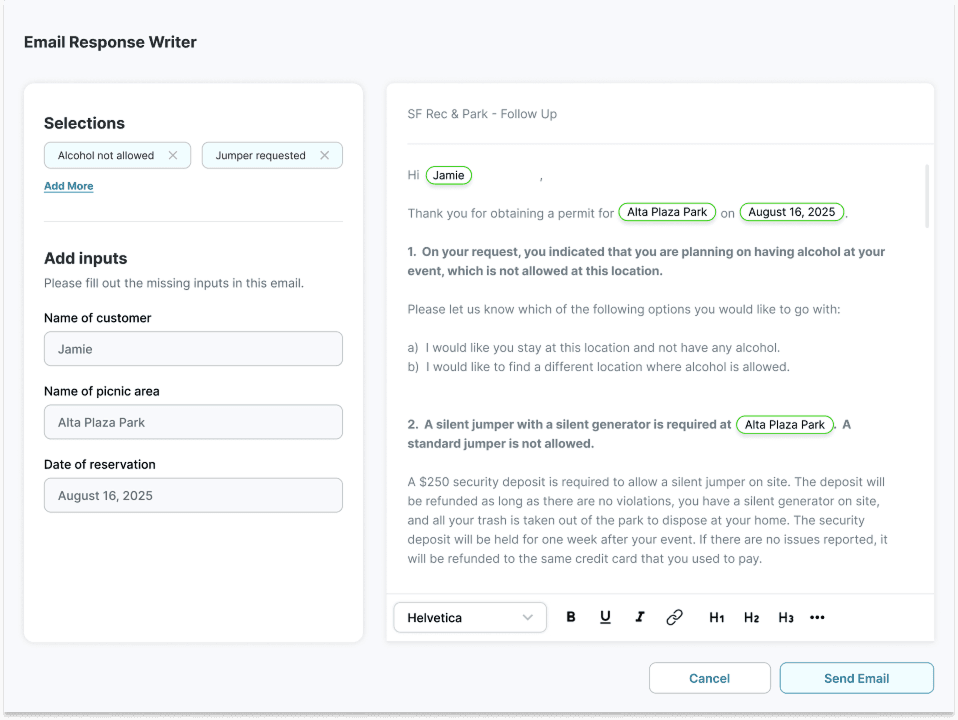
To support SFRPD's lean staff in handling the high volume of repetitive resident inquiries, we developed a lightweight "email helper" browser extension. Instead of manually drafting or searching for past responses, staff can now select from customizable, pre-built templates to generate accurate, consistent replies in seconds.
This improves efficiency, ensures consistency, and scales communication without additional staffing or software. Future versions might include shared template libraries and smart reply suggestions, but even as it exists today, the tool offers a practical, low-lift solution to a high-volume pain point.
Key Features
Template Management — Users can create, update, delete, and categorize templates. These are written in a customized rich-text editor that has been adapted with a custom node for inserting in-line template inputs.
Template Sharing — Users may import and export to the extension in structured file format, providing the convenience of sharing templates while still avoiding the complexities of maintaining a centralized system.
Two Methods of Template Use — Once a template has been completed, users can either create a draft in their default mail app or copy the email content.
Design Process
Problem: From our interviews with SFRPD call center staff and analysis of 4,900 emails between staff and customers, we discovered that staff spend a lot of time manually drafting and sending follow-up emails to customers as part of the picnic permit approval process. Whenever a customer submits a picnic permit application that requires further approval (e.g. the customer indicates that they want a bouncy house at their event), staff must send an email explaining the policies and requirements for the desired amenity, informing them that the desired amenity is not allowed, or asking them to provide further clarification for their request. These follow-up emails are drafted manually each time by the individual staff member, which is time consuming, tedious, and inconsistent.
How Might We: How might we automate the process of following up with customers regarding their picnic permit applications in order to improve staff efficiency and provide customers with more consistent responses?
Ideation: We conducted a brainstorming session where we came up with ideas to reduce the manual back and forth between staff and customers. One idea revolved around immediately prompting the customer to send information that will be required by staff, either directly through ActiveNet or through an automated email. Another idea was about improving the form validation so that customers wouldn't be able to submit if they selected the wrong answers and staff wouldn't have to manually verify the answers. Eventually we pursued the idea of a browser extension that allows staff to draft follow-up emails using templates. We chose this idea because it's something our team could develop within the timeline of the project, it doesn't require new third-party vendors, and it doesn't require integrating with ActiveNet.
Testing & Iterations
- Adding draft creation with adaptations: Our initial intention was for users to copy their completed template from the extension and paste the content into a draft email they created on their own. Both our mentors and a tester suggested the ability to send the templated email directly from the extension would be helpful. However, further exploration yielded that sending emails from browser extensions is not possible, and though drafts could be created with
mailto:, this would not preserve formatting. As a compromise, we've provided users with the option to either use the template to create an unformatted draft in their default mail application, or manually copy and paste the completed template with formatting. - Reusing Inputs: We recognized that making the user recreate certain custom inputs would be inefficient; for example, most templates would include "Park Name" and "Date of Reservation." The custom input node has been designed to display a list of previous and/or hardcoded input names for the user to select from if desired.
- Optimizing Layout: Our first renditions included clearly separated steps for completing inputs and previewing the completed template. Testers recommended combining these actions into a single window, which is where the final design stands.
- Finding a Centralization Alternative: Though an ideal flow for a tool like this would be one in which an administrative user could maintain templates and push updates across an organization, we wanted this solution to be free from the costs of hosting and data storage. Even if we couldn't centralize data at a single source, there needed to be a reasonably low-effort way for multiple users to share templates. As a result, the design now includes an export function that allows user A to generate a file of their current templates that can then be imported to user B's instance of the tool.
Implementation
We will hand off a working application and do not expect SFRPD to do any additional development or design work on this tool. By the close of Capstone, we will have submitted the extension for review in the Microsoft and Chrome web stores. Pending approval and vetting by SFRPD's in-house IT team, the tool should be available for staff to adopt into their workflows if desired.
Success Metrics
- Time-on-task: How long it takes staff to write an email using Email Helper vs. how long it takes without Email Helper.
- Staff adoption: Do staff actually use Email Helper? Do they perceive it to be useful?
Overview
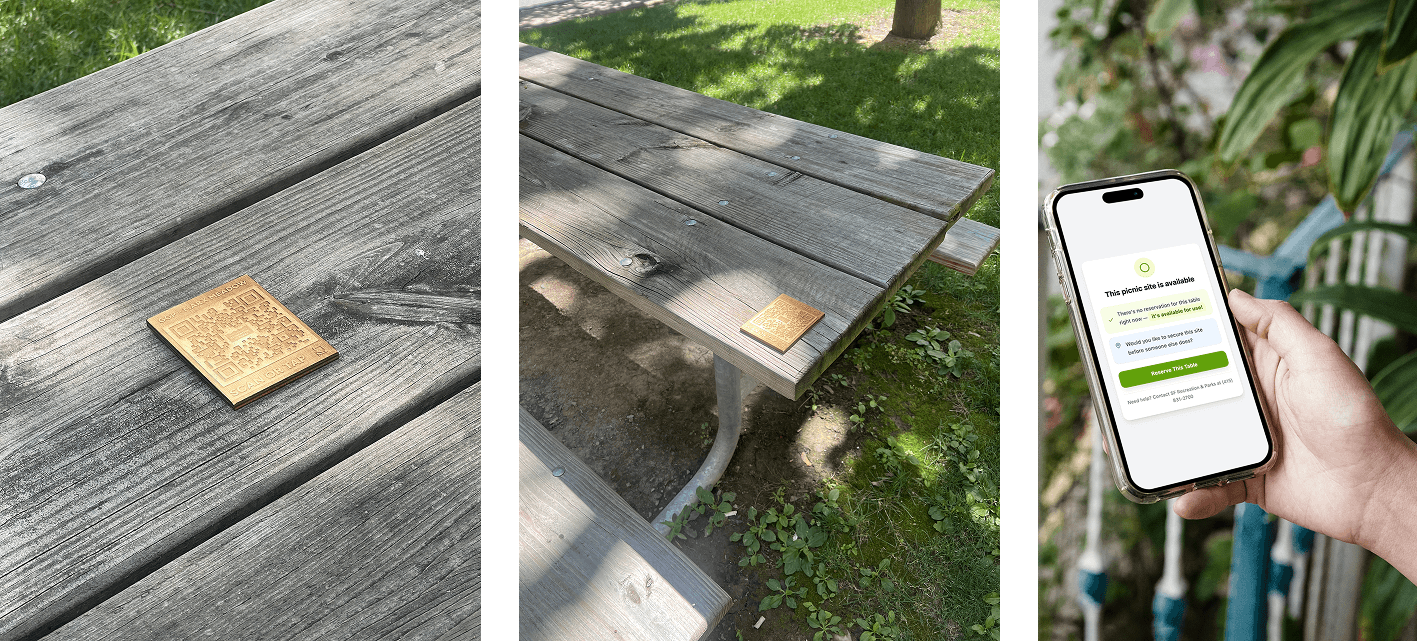
The final QR/NFC plaques are multi-modal, low-barrier touchpoints designed to offer just-in-time information. Mounted directly onto picnic tables and signage posts, they invite users to either scan or tap with their phones to see real-time site availability, reservation status, and relevant park guidelines.
This solution doesn't just inform — it builds awareness of SFRPD's broader digital ecosystem, nudging users toward self-service, reservation literacy, and better park experiences overall.
Key Features
QR Codes — Each sign displays a prominently placed QR code that links to a mobile-friendly page with park-specific content. Users can simply scan the QR code with their phone camera to access information without having to download an app.
NFC Technology — NFC chips can be embedded in or attached to the signage. These allow compatible smartphones to tap the sign and access the same content instantly. Key advantages include faster access, more intuitive interaction for tech-savvy users, and less visual clutter.
Relevant and Timely Information — Scanning or tapping provides access to rules and regulations, real-time picnic table availability, reservation instructions, contact information, safety alerts, and live updates during events. Content can be updated remotely through a centralized CMS.
Design Process
Problem: Through our conversations with SF park goers and SFRPD staff, we learned that most park goers are not aware of the existence of a reservation system, which causes unintentional rule-breaking and conflict between park goers. Many areas lack visible signage, rules and booking information aren't easily accessible on-site, and park goers don't always receive guidance in person. This situation leaves park goers feeling confused, frustrated, and unsure of how to engage with park facilities.
How Might We: How might we improve awareness of SFRPD's reservation system, park rules, and real-time availability of park facilities for in-person park goers?
Ideation: Through early prototyping and concept testing, we explored several ideas for improving awareness of the reservation system for in-person park goers — distributing zines, adding maps to the parks, and putting up signs with QR codes or phone numbers. We found that although park goers do not have a strong desire to make on-the-spot reservations, they do want to know about the rules for using a facility and whether or not the facility has been reserved. We decided to move forward with QR codes and NFCs because it's technically simple to implement and doesn't add additional signage to the parks.
Design Decisions
- Identifying Key Use Moments: We mapped out where and when this feature would be most helpful — for example, when visitors arrived at a picnic table and weren't sure if it was already reserved, or when they were looking for nearby amenities without signage.
- Exploring Material Options: Because the plaques would live outdoors year-round, we tested materials that could withstand sun, rain, and potential vandalism. We landed on a razor-cut acrylic design that's durable and discreet, with both a QR code and embedded NFC chip.
- Before-and-After Journey Mapping: We considered what users currently do when they're unsure about availability or rules, and how scanning or tapping a sign could shift that experience. This led to clearer language on the plaque and a mobile landing page that prioritizes immediate info (like availability) up top.
- Clarifying Who Benefits Most: The design especially supports visitors who might otherwise struggle to access park information, and residents who rarely use the SFRPD website. With more than half of those we spoke to in SF being unaware of the department's reservation system, this solution creates an alternative point of entry by reaching users in the physical space.
Implementation
- Install signage at key locations — picnic tables, reservable facilities, park entrances, or activity zones. Ensure visibility and durability.
- Assign ownership of link content. Designate a staff member or team to manage the URLs behind the QR codes. Update real-time information through a centralized platform.
- Monitor usage and feedback using a link management tool (e.g., Bitly or Google Analytics) to track how often each code is scanned.
- Plan for maintenance and expansion. Schedule periodic checks to ensure signage remains scannable and intact.
Success Metrics
- Number of scans per location: Track engagement using link management tools to understand which locations see the most usage.
- Repeat scans vs. unique users: Measure whether users are returning or if each scan represents a new user.
- Visitor satisfaction: Implement short in-page polls to gather feedback on the usefulness and clarity of the information provided.
- Reduction in staff-reported incidents: Monitor whether there's a decrease in confusion-related incidents or questions that staff need to address in person.
Overview
We created a set of actionable guidelines and sample redesigns to help SFRPD create a more usable, accessible, and trustworthy website. These recommendations can be implemented within CivicPlus and aim to reduce confusion and customer support burden.
Style Guidelines
According to CSS Stats, the Picnic Rentals page uses 93 unique colors, 60 unique font sizes, and 26 unique font families. We recommend consolidating these into a single style guide that includes visual identity, layout templates, UI components, and writing tone to ensure consistency across departments.
Visual Identity & Branding
Logo usage guidelines and placement rules, official color palette with hex codes, typography specifications (font families, sizes, weights, line heights), and a consistent heading hierarchy.
Content Structure & Layout
Page template specifications for common page types, consistent information architecture, progressive disclosure principles for complex information, and standardized content sections.
User Interface Elements
Button styles and states, link formatting and behavior, form design standards, navigation menu consistency, and call-to-action styling.
Content Guidelines
Writing tone and voice for park communications, information prioritization, and consistent terminology across all pages.
Accessibility
Web accessibility ensures that everyone — including people with disabilities — can use and benefit from the website. As a government organization, SFRPD's digital properties are required to adhere to accessibility standards including Section 508 of the Rehabilitation Act, California Government Code Sections 7405 and 11135, and WCAG 2.2.
Key best practices we outlined:
- Alternative Text: All meaningful images must have descriptive alt text. Decorative images should have empty alt tags.
- High Contrast: Text should have a contrast ratio of at least 4.5:1. For large text (18pt+), the ratio is 3:1.
- Sufficient Font Size: Body text should be a minimum of 16px. No text should be smaller than 12px.
- Label All Form Fields: Every input field must have a programmatically associated label.
- Keyboard Navigation: Ensure interactive elements can be accessed via Tab, Enter, and Arrow keys.
- Correct Heading Hierarchy: Structure content with a logical hierarchy (H1, H2, H3, etc.).
- Avoid Layout Tables: Use tables only for data, not layout. Use CSS for structure.
CivicPlus Widget Guidelines
We created a guide detailing the available CivicPlus widgets, outlining each widget's purpose, providing examples of correct implementation, and defining best practices for use. Widgets covered include Editor, Image, Slideshow, Related Documents, Pages, Spacer, Tabbed, and List.
Next Steps
- Audit & Prioritize: Conduct a full audit to identify all pages that need updating.
- Develop Templates: Create official page templates within CivicPlus for common page types.
- Train Staff: Ensure all staff members responsible for updating the website are trained on this content and accessibility guidelines.
Overview
Since the start of this project, SFRPD has expressed interest in implementing an AI chatbot offered by CivicPlus to address the issue of poor website usability. They asked our team to test the performance of this chatbot in a sandbox environment so that they could request improvements from the vendor.
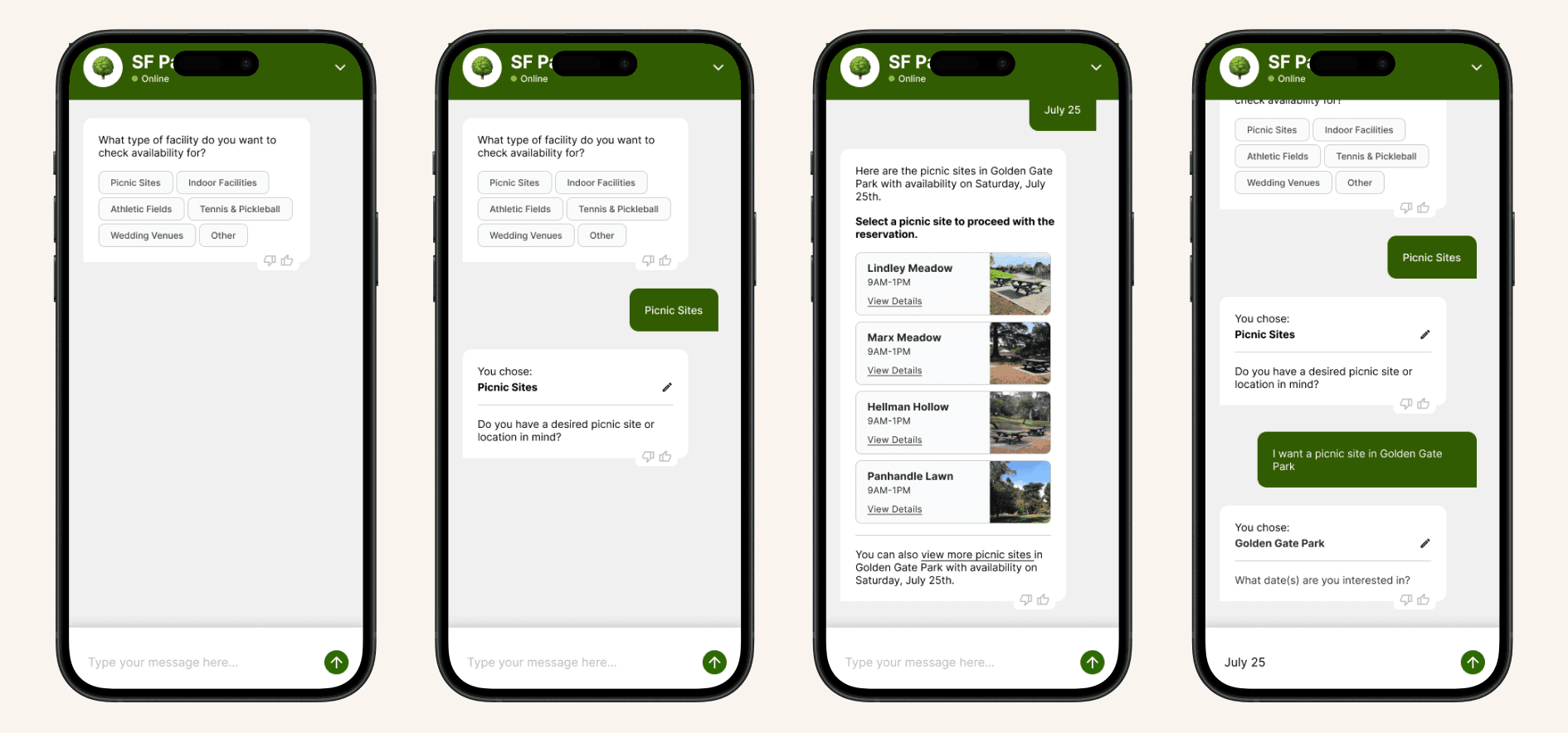
Our chatbot testing revealed critical gaps between current chatbot capabilities and service delivery requirements, while our design of an ideal chatbot demonstrates the functionalities that a chatbot should be able to perform in order to be truly useful for users and staff.
Chatbot Testing
We initially came up with a systematic evaluation method with metrics across five criteria. However, once we saw how limited the current chatbot's capabilities are, we realized that a detailed numerical assessment wouldn't be useful. Instead, we identified basic performance gaps through 40+ test scenarios covering the most common user inquiries.
Key Findings:
- Failure to Handle Basic Inquiries: When asked about picnic permits through the "quick question" feature, the chatbot responded: "I'm having trouble finding an answer."
- Failure to Provide Consistent Responses: When asked "How do I make a picnic permit?", the chatbot responded correctly, but it failed for "How do I reserve a picnic area?" — the same question.
- Failure to Provide Accurate Answers: When asked to recommend a picnic site in Golden Gate Park, the chatbot recommended Golden Gate Heights Picnic Area, which is an entirely different park.
- Failure to Retain Context: When asked "How much does it cost?" after correctly answering "How do I reserve an athletic field?", the chatbot provided unrelated costs.
- Failure to Provide Up-to-Date Information: When asked if a park had restrooms, the chatbot referenced a Taskforce Restroom Report from 2009.
- Failure to Provide Correct Links: When asked about availability, the chatbot linked to a "Tentative Calendar for Special Events" instead of the proper ActiveNet availability calendar.
Testing Implications: The testing reinforced our stance that the effectiveness of a chatbot is entirely dependent on the quality of the content that it's based off of. Poor information architecture directly translates to unreliable chatbot performance. Given the limited capabilities of the CivicPlus chatbot, it's unlikely to significantly reduce the volume of phone calls and emails to staff.
Ideal Chatbot Design
We designed an ideal chatbot demonstrating the capabilities and use cases that the current chatbot should be able to perform but is lacking. Our ideal chatbot has four primary capabilities:
- Information Gathering — Handles FAQs about policies, fees, and cancellations and explains reservation and permit processes step-by-step.
- Real-Time Availability — Allows users to check facility availability in real-time, including which sites are available on specific dates and which dates specific sites are available.
- Booking Facilitation — Facilitates the entire booking process up to actual payment, collecting user information about desired location, date, attendee numbers, and amenities.
- Post-Booking Self-Service — Provides post-booking options including checking application status, modifying and cancelling reservations, and initiating refunds.
Beyond structured conversations, the chatbot handles user inquiries through free-form conversation, enabling users to ask any question within the chatbot's domain and receive accurate, relevant answers.
How It Differs from CivicPlus' Chatbot
Current CivicPlus Chatbot: Can only read content on SFRPD's public-facing website, performs basic information gathering only, has no integration with reservation systems, provides static and outdated information, and has limited conversational context.
Our Ideal Chatbot: Integrates directly with third-party reservation systems, has real-time data synchronization, plays an active role in facilitating bookings, supports comprehensive self-service, and handles high-frequency, low-to-medium complexity interactions.
Overview
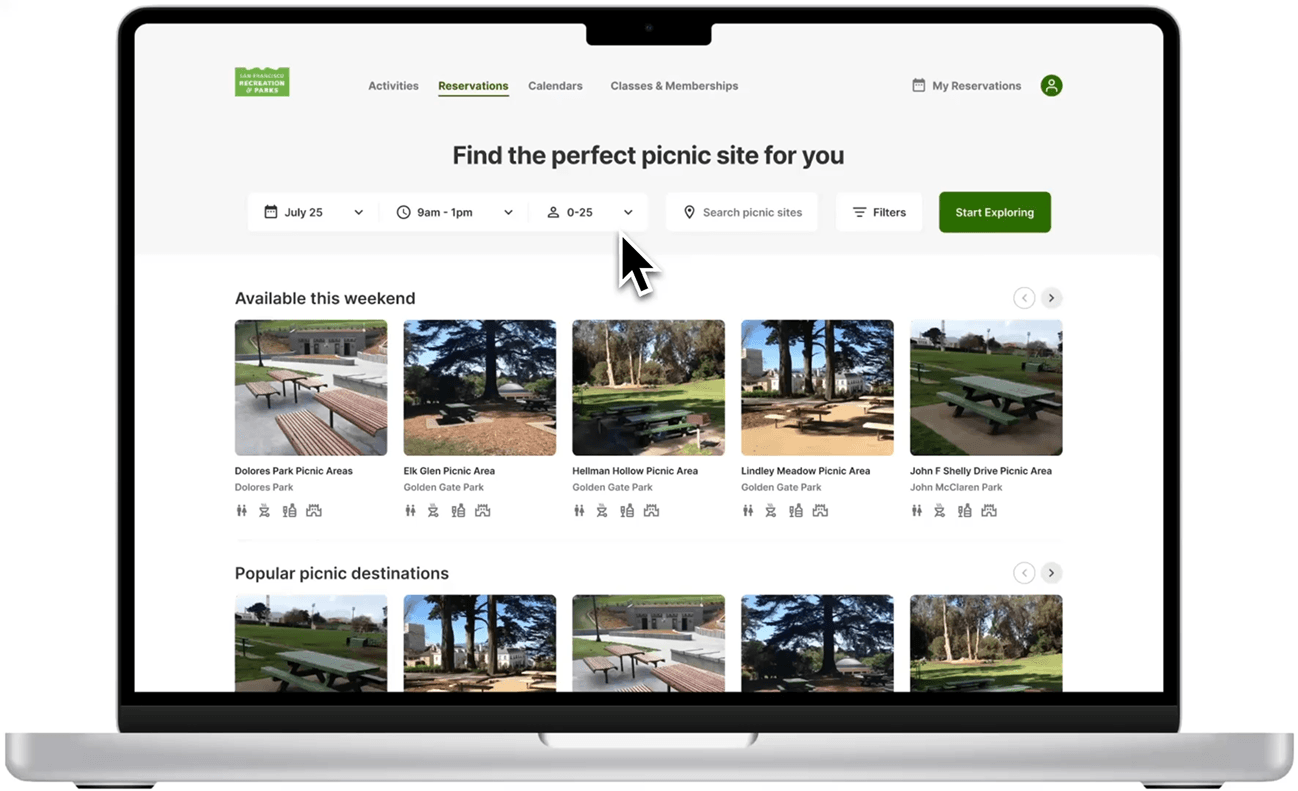
With SFRPD's current contract with ActiveNet ending, we saw a critical opportunity to rethink and redesign their fragmented reservation infrastructure. Our goal was to create a clear, consolidated vision for what a modern, user-centered reservation system — one that reduces confusion, supports diverse users, and empowers staff — could look like.
We delivered a comprehensive RFP planning document that outlines functional requirements for a web-based reservation system, user-facing features (interactive maps, smart search filters, real-time booking, mobile responsiveness), and administrative tools for managing bookings, processing payments, resolving conflicts, and generating usage reports.
The plan also includes integration requirements with CivicPlus, GIS mapping, and secure payment portals, as well as support and training plans to ensure smooth onboarding and long-term system success.
Writing Process
- Clarifying Stakeholder Needs: We mapped the pain points of each stakeholder group — from overwhelmed call center staff and confused first-time users, to mobile-first park visitors and program instructors.
- Studying Platform Fragmentation: We identified how the disjointed use of multiple platforms (e.g. CivicPlus, ActiveNet, Rec.us) created confusion and inefficiencies. This reinforced the need for a single integrated system.
- Balancing Public vs. Staff Functions: We defined not just user-facing features like smart filters or payment tools, but also backend needs like admin dashboards, pricing logic, conflict resolution tools, and logging capability.
- Planning for Edge Cases and Accessibility: We considered edge cases throughout — site closures, reservation cancellation/editing, support for low digital-literacy users, and non-English speakers.
- Ensuring Long-Term Sustainability: Beyond features, we included expectations around implementation, staff training, technical support, and accessibility to ensure the solution is practical and maintainable.
Key Iterations
After feedback from faculty mentors, we reflected critically on the scope and structure of our RFP document. The mentors noted that the RFP served as a comprehensive summary of our research, but it remained largely a list of features without prioritization or concrete design explorations. We made key improvements:
- Feature Prioritization: We prioritized features to distinguish core functionality from enhancements, helping vendors understand what's essential versus nice-to-have.
- Sample Design Development: We developed sample designs for selected high-impact features to demonstrate critical functionality in its ideal state.
- Current System Shortcomings: The document was edited to explicitly address shortcomings of the current system, positioning vendors to propose targeted solutions.
Impact & Value
- Clear vendor communication: Provides SFRPD with a structured way to communicate their needs to potential vendors, reducing misunderstandings.
- Research-grounded requirements: All requirements are based on extensive user research, staff interviews, and system analysis, ensuring the new system addresses actual pain points.
- Future-focused vision: The ideal system design provides a concrete vision for what success looks like, helping SFRPD evaluate vendor proposals against a clear standard.
- Operational efficiency: By addressing current system fragmentation and staff workflow issues, the new system will significantly reduce manual work and improve service delivery.